UX/UI Design
Everli for Business
Building B2B grocery ordering from zero to one

context
Everli connects shoppers with local supermarkets for grocery delivery, but the platform was built entirely around individual consumers. Businesses, offices, restaurants, small retailers, anyone needing to purchase groceries and supplies at scale, had no dedicated way to do that on Everli.
They were left using a consumer tool for a business need: no shared accounts, no visibility into who was ordering what, no way to manage spend across a team, and no invoicing built for procurement or accounting workflows.
Everli for Business set out to close that gap: a B2B layer on top of the existing platform that would let companies purchase groceries the way they purchase any other business expense.
Core problem
There was no structure for a company to act as a single customer. Every order lived under one person's individual login, with no way to:
Create a business account distinct from a personal one
Assign different levels of access, admins who manage the account versus buyers who place orders
Keep track of who on a team was ordering, and what they were ordering, on the company's behalf
Receive invoices that matched how businesses actually handle purchasing and accounting, rather than a stream of individual consumer receipts
Without this, Everli couldn't credibly sell into companies. The first phase of Everli for Business needed to lay this foundation before anything else, like catalog curation or delivery scheduling for businesses, could be built on top of it.
How might we let businesses purchase groceries as a company, not as an individual?
Process
This phase was driven primarily through desk research rather than direct user testing, given timeline and resourcing constraints typical of a first release. That meant:
Reviewing how comparable B2B and marketplace platforms structured account hierarchies, roles, and permissions, to ground the design in patterns that business buyers would already find familiar
Mapping the core actors in a business account, admins, buyers, and the account itself, and defining what each needed to see and do
Working through the invoicing flow requirements with an eye toward what finance and procurement teams expect from a B2B vendor, not a consumer receipt
The absence of workshops or usability testing at this stage meant leaning more heavily on established B2B conventions and internal stakeholder input to de-risk the design, rather than validating directly with end users before launch.
Solution
The first phase release covered four connected pieces of the system:
Business account creation A registration flow that let a company set up a business profile separate from any individual consumer account, establishing the entity that everything else, roles, buyers, invoices, would attach to.
Roles and permissions dashboard A dashboard distinguishing admins from buyers. Admins could manage the account, oversee who had access, and control settings; buyers could place orders within the boundaries the admin set. This was the mechanism that let a business actually delegate purchasing without losing oversight.
Team management Tools for admins to add and remove team members, and assign them the buyer or admin role, so a company's purchasing team could grow or change without needing to rebuild the account.
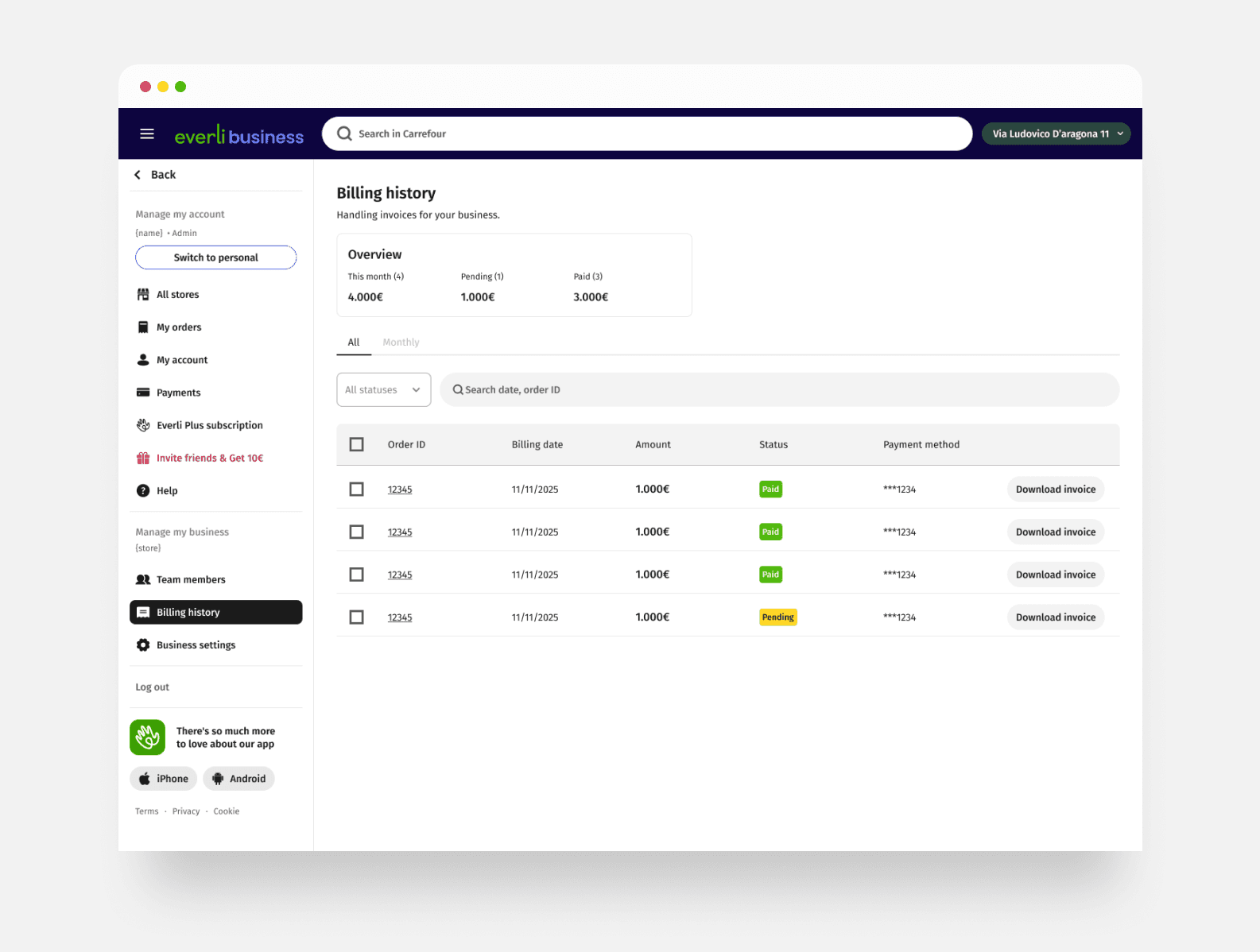
Invoicing An invoicing structure built around how businesses actually reconcile spend, consolidating orders in a way a finance team could work with, rather than the itemized, consumer-style receipts Everli issued to individual shoppers.


Scroll to see more